
よくある質問
作業中
目次
1. 何かうまく機能しないんだけど、他の人たちは普通にプレイできている?(キャッシュのクリア)
2. 現在の経済フェーズは何ですか?
3. コンテストはどのように機能しますか?
4. チャットルームをオンにするには?
5. 「Q」とはどういう意味ですか?
6. 取引所にいるNPCの会社は何ですか?
7. レベルアップするにはどうすればいいですか?
8. 取引所はどのように使いますか?
9. 契約はどのように送りますか?
10. 建物をアップグレードするとどうなりますか?
11. 鉱山、石油掘削用リグ、採石場の資源の埋蔵度はどのように割り当てられますか?
12. 建物を売ったり壊したりすることはできますか?
13. なぜ管理費が上がるのですか?
14. 会計費(Accounting overhead)とは何ですか?
15. 研究は何のためにあるのですか?
16. ゲームのタイムテーブルはどこにありますか?
17. 包括利益(Comprehensive Income)はどのように計算されますか?
18. 会社の写真(アバター)に表示されているシンボルは何ですか?
19. 倉庫にある「Purchases(購入)」と「Returns(返品)」とはどういう意味ですか?
20. パーソナルアシスタントから労働者の賃金の増減や小売価格の変動についてのメッセージが届きました。
21. 複数のアカウントを作成することはできますか?
22. なぜこれ以上パーソナルアシスタント(PA)のクエストが来ないのですか?
23. 新機能はどれくらいの頻度で追加されますか?
24. 受信した契約の色(赤、緑、黒)が違うのはなぜですか?
25. アカウントをリセット、または削除するにはどうすればいいですか?
26. Attitude Control(姿勢制御)のスペルは間違っていませんか?
27. 購入したSim Boostsが受け取れないのはなぜですか?
28. 独自の質問がありますか?
1. 何かうまく機能しないんだけど、他の人たちは普通にプレイできている?
Sim Companiesは、画面の読み込みを速くし、ゲームのパフォーマンスを向上させるために、データやコードをご利用のデバイスに保存しています。しかし、一部のデバイスやブラウザ(Safariなど)は必ずしも業界標準に従っておらず、デバイスが自動的に更新されるべき時に更新されないことがあります。これがゲームプレイに問題を引き起こす原因となる場合があります。
問題が発生している場合は、こちらのリンクにアクセスしてください:bust caches(キャッシュのクリア)。(問題が発生しているデバイスからこのリンクにアクセスする必要があります。チャットに貼られたリンクからでは機能しない場合があります。)
それでも解決しない場合は、こちらからバグを報告し、サポートにメッセージを送ることができます。
Sim Timesの第99号には、サポートへのメッセージの書き方に関する記事があります。
こちらはSim Companiesのステータスページへのリンクです。これにより、プレイヤーはゲームが正常に稼働しているかどうかを確認できます。
また、ゲームをリフレッシュするだけでも、キャッシュをクリアせずに多くの問題が解決します。モバイルでリフレッシュするには、ゲームがリフレッシュされるまで画面を下に引っ張ってください。
2. 現在の経済フェーズは何ですか?
現在の経済フェーズ:本社(HQ)を確認してください。
経済には3つの可能なフェーズがあります。「不況(Recession)」、「通常(Normal)」、「好況(Boom)」です。
フェーズは一方向にしか移動しないか、そのまま維持されます。
例:
・
- 好況(Boom):維持されるか、通常(Normal)へ移行する
- 不況(Recession):維持されるか、通常(Normal)へ移行する
- 通常(Normal):維持されるか、好況(Boom)または不況(Recession)へ移行する
・
・
毎週金曜日に経済が変動する可能性があります。
15:00 UTC - 経済フェーズの移行。経済変動が起こる現地時間については、図書館(Library)のタイムテーブル(Time Table)の記事を参照してください。
・不況:生産量が多くなる一方で、小売店の販売量は少なくなります。
・好況:生産量が少なくなる一方で、小売店の販売量は多くなります。
・通常:好況と不況のバランスが取れた状態です。
詳細については下にスクロールして、「20. パーソナルアシスタントから労働者の賃金の増減や小売価格の変動についてのメッセージが届きました」を参照してください。
地元新聞「The Sim Companies Times」の役立つ記事:
・経済フェーズの背後にある数字 (1)
・経済フェーズの背後にある数字 (2)
・経済の影響:食品産業
・経済フェーズの変更とその影響
3. コンテストはどのように機能しますか?
コンテストは2週間にわたって開催されます。コンテストとは何でしょうか?それは製品を「寄付」することです!
対象となる製品は、コンテスト期間中ずっと同じです。
終了時に最も多くのポイントを集めた人が、プロフィールに飾れる証明書を受け取ります。ポイントは、過去24時間に最も多く寄付した人々に毎日与えられます。リーダーボードの画面には上位30人のプレイヤーが表示され、一番下にあなたの会社のランクが表示されます。
どのように寄付できますか?
本社(倉庫)でコンテスト対象の製品を開くと、「Donate to contest(コンテストに寄付する)」という別のボタンが表示されます。
勝者は何を得られますか?
証明書と、ロゴ/アバターに飾れるトロフィーが贈られます。また、そのコンテストの製品のユニークな収集品(コレクティブル)ももらえます。
ご注意:コンテストで勝つには数千万ドルの現金がかかるため、本気で狙うつもりがない場合は何も寄付するべきではありません。
例:
「Zipping through the Tulips(チューリップを駆け抜けて)」〜 勝者は121,381,007個の種(seeds)を寄付し、これは約2,520万ドルに相当しました。
4. チャットルームをオンにするには?
チャットルームを表示するには:
1. チャットルームの上にある3つの点をクリック/タップします。
2. Account Settings(アカウント設定:右側の歯車アイコン)
3. Chatrooms(チャットルーム)
4. 表示したいものにチェックを入れます。
チェックを入れると、チャットルームは自動的に保存されます。
5. 「Q」とはどういう意味ですか?
Qは品質(quality)を意味します。誰かが q0、q1、q2 と使っているのを見かけたら、それは製品の品質について言及しています。品質についての詳細は、研究ガイド(Research Guide)を参照してください。
ゲームの略語については、Sim Companies Timesの「Game Jargon(ゲームの専門用語 - 新聞第75号)」でさらに見つけることができます。
6. 取引所にいるNPCの会社は何ですか?
NPCは「Non-Player Character(ノンプレイヤーキャラクター)」の略です。これはSim Companiesによって運営されているボットで、ゲームに不可欠な資源を取引所に提供することを目的としています。プレイヤーが利益を出して低価格で販売できるように、価格は高めに設定されています。NPCが提供する資源は以下の通りです:種、輸送、電力、水、鉄筋コンクリート、レンガ、板材、建設ユニット。
7. レベルアップするにはどうすればいいですか?
新しい建物を建設し、それを使用することでレベルアップします。契約を送ったり、取引所で商品を販売したりしても、レベルアップには貢献しません。
より詳細な説明はこちらで見つけることができます:レベルアップと経験値の獲得(Leveling and Experience Gain)
8. 取引所はどのように使いますか?
本社(倉庫)にアクセスし、資源をクリックして「SELL ON THE EXCHANGE(取引所で販売)」をクリックし、数量と価格を入力してから「SELL ON THE EXCHANGE」を押す必要があります。
注文が取引された際、市場手数料(market fee)を支払うことになります。市場手数料は、注文が満たされた割合に応じて比例して支払われます。
資源によっては、「輸送ユニット(Transportation units)」も提供する必要があります。これらは取引所で購入できます。
- 50x が必要な輸送量
- $3 は3%の手数料(注意:市場手数料は開発者による経済的変更に基づいて変動する可能性があります)
- $0.030 はユニットあたりのコスト
・
・
・
注意:輸送は倉庫のインベントリから引き出されます。輸送を持っていない場合、取引所に出品することはできません。
自分の名前の横にある青い「X」をクリック/タップすることで、いつでも市場の注文をキャンセルできます。または、プロフィールに移動して「Market Orders(市場注文)」ボックスを見つけ、「Cancel」を選択します。
製品が倉庫から出荷されなかったため、輸送ユニットはあなたに返還されます。
まだ支払われていなかった市場手数料もキャンセル時に返金されますが、出品から48時間が経過した後のみです。すでに行われた注文は変更できず、キャンセルのみ可能です。
(この例は3%の場合です。この値は開発者による経済的変更に依存して変動する可能性があります)
例えば、原油(Crude Oil)を$28で取引所に出品するとします。手数料として $28 × 3% = $0.84 を支払い、輸送ユニットを1つ消費します。輸送費が$0.35だと仮定します。したがって、原油を市場で販売するためのコストは $0.84 + $0.35 = $1.19 となり、手元に残るのは $28 - $1.19 = $26.81 となります。もしこの原油を契約(contracts)を使って販売した場合、市場手数料はかからず、輸送ユニットも半分の量で済みます。このコストは $0.35 / 2 = $0.175 となり、手元に残るのは $28 - $0.175 = $27.825 となります。取引所で販売するか、契約経由で販売するかを決定する際には、この点を考慮することを忘れないでください。
(注意:市場手数料は開発者による経済的変更に基づいて変動する可能性があります)
EXCHANGE PRIORITY(取引所の優先順位)
取引所でアイテムを見る際、各出品は以下の優先順位に基づいています:
価格(price) / 品質(quality) / タイムスタンプ(timestamp)
・価格:低い価格が優先されます
・品質:高い品質が優先されます
・タイムスタンプ:古い(長い)時間が優先されます
タイムスタンプは、注文が入力または更新された時間です。注文を更新するとタイムスタンプがリセットされ、順番の最後尾に回されます。
BUY ORDERS(買い注文)
現在、レベル25の要件があります。
コスト:買い注文1件につき1 Sim Boosts。
買い注文の投稿
以下のいずれかの状態になるまで取引所に残る買い注文を作成できます:
・同じ価格またはより低い価格の新しい売り注文が投稿された時
・注文がキャンセルされた時(現金は全額返金されます)
注文が投稿されると現金が取引所に送られる必要があり、これは通常の現金と同じように「会計費(Accounting Overhead)」(14番を参照)の計算対象としてカウントされます。
あなたの買い注文は、倉庫の「Stats(統計)」タブで見つけることができます。
すべての買い注文は隠されており、他の誰の買い注文も見ることはできません。
9. 契約はどのように送りますか?
契約を送受信するには、レベル5以上(ファミリービジネス)である必要があります。
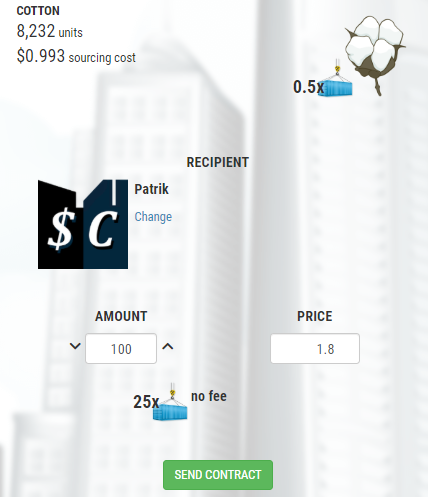
本社(倉庫)にアクセスし、資源をクリックして数量と価格を入力し、「SEND CONTRACT(契約を送る)」を押します。受取先の会社名を入力してください。お金があなたに振り込まれる前に、受取人があなたの契約を承認する必要があります。どちらの当事者も、まだ承認されていない契約をキャンセルすることができ、輸送ユニットを含むすべての資源は返還されます。
- 25x が必要な輸送量
- 手数料はかかりません
・
・
注意:輸送は倉庫のインベントリから引き出されます。輸送を持っていない場合、契約を送ることはできません。
取引所での販売と比較して、契約を使用すると市場手数料を支払う必要がなく、必要な輸送ユニットも半分で済みます。
10. 建物をアップグレードするとどうなりますか?
すべての建物は、生産/販売能力を高めるためにアップグレードできます。建物をアップグレードするには、その建物をクリックし、「UPGRADE BUILDING(建物をアップグレード)」ボタンをクリックします。すべての建物はレベル1から始まります。レベル2にアップグレードすると、生産/販売能力が2倍になります。レベル3の建物はレベル1の建物の3倍、レベル4の建物は4倍の生産/販売を行います。
レベル5の建物1つ = レベル1の建物5つ分(数量)
11. 鉱山、石油掘削用リグ、採石場の資源の埋蔵度はどのように割り当てられますか?
言及された3つの建物の生産量は、資源の埋蔵度(Abundance)に依存します。
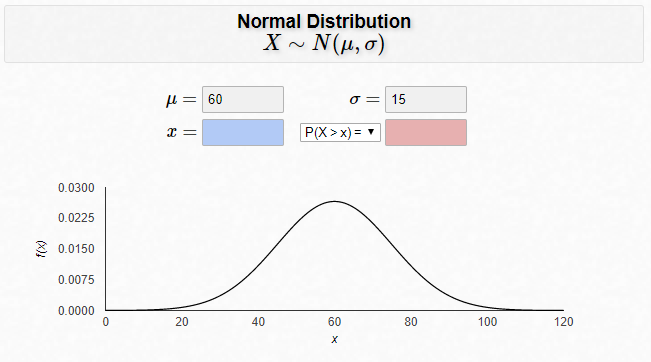
埋蔵度は建物が最初に建設された時にランダムに割り当てられ、その後1日あたり0.032%ずつゆっくりと減少します。建物で生産される各資源には、平均0.6(60%)、標準偏差0.15のガウス分布(正規分布)を用いて固有の埋蔵度が割り当てられます。計算結果が1(100%)を超える値は1(100%)に切り捨てられ、0.1(10%)を下回る値は0.1(10%)に切り上げられます。
min(1.0, max(0.1, gauss(mu=0.6, sigma=0.15)))
Sim Companies Libraryを通じて追加された役立つ情報:
埋蔵度(Abundance)
12. 建物を売ったり壊したりすることはできますか?
建物を他のプレイヤーに売ることはできませんが、レベル5に達すると建物を解体(スクラップ)して投資の一部を回収することができます。建物がレベル1または2の場合、投資額を全額回収できます。レベル2を超える建物を解体した場合、投資額の全額は戻ってきません。レベル5の建物を破壊すると、レベル1の建物の5倍の価値が戻ってきます。
ケース1:レベル5の農場(Farm)の建設資源には、約 $6,900 + $6,900 + $13,800 + $20,700 + $27,600 = $75,900 かかります。もしこのレベル5の建物を解体した場合、$6,900 × 5 = $34,500 相当の建設資源しか戻ってきません。
ケース2:レベル2の石油掘削用リグの建設資源には、約 $69,000 + $69,000 = $138,000 かかります。もしこのレベル2の建物を解体した場合、$69,000 × 2 = $138,000 相当の建設資源が戻ってきます。
注意:会社レベル20で「建物オークション(Building Auctions)」がアンロックされます。
13. なぜ管理費が上がるのですか?
まず第一に、巨大な会社を築き上げたこと、おめでとうございます!そうでなければ、この問題は発生しません!従業員が増えれば増えるほど、管理費(administration overhead)に費やすお金も増えます。建物をレベルアップするたびに、会社の労働者が100人増え、さらに管理スタッフも追加されます。会社が持つ建物のレベルが増えれば増えるほど、建物をレベルアップするたびに採用される管理スタッフの数も多くなります。
管理規模が大きくなりすぎた場合は、以下の選択肢を検討してください:労働集約的でない製品に焦点を当てるか、低レベルでも高い利益をもたらす建物に投資することです。また、研究(research)に投資することもでき、これにより建物を拡張しなくても同じ資源でより高い利益を得ることができます。また、COO(最高執行責任者)を雇うことも検討してください。彼らは会社の管理費を削減します。詳細は役員ガイド(executives guide)を参照してください。
14. 会計費(Accounting overhead)とは何ですか?
会社のすべての資金を管理するにはお金がかかります。ここでは、あなたの会社が支払う会計費用の計算方法を説明します。会計のスキルを持つ役員(Executives)は、会計基準額(accounting base)を下げるのに役立ちます。社債(Bonds)を購入すると手数料が増加します。純社債 + 現金 - 役員による削減額、となります。以下の計算式を参照してください。
会計基準額 = (購入した社債 - 販売した社債) + 現金 - 役員による削減額
[会計基準額] : [パーセンテージ]
・$3,000,000まで : 0%
・$3Mから$6Mまで : 0.5%
・$6Mから$9Mまで : 1.0%
・$9Mから$12Mまで : 1.5%
・$12Mから$15Mまで : 2%
・$15,000,000以上 : 3%
CFO(最高財務責任者)による削減の例:
300万ドル + 400万ドル = 700万ドル
現金および社債の価値が700万ドルを超えた部分 = $137,918
$137,918 × 0.5% = $690(切り上げ)
会計費用は毎日同じ時間に自動的に差し引かれます。現地時間についてはタイムテーブル(Time Table)を参照してください。
地元新聞「The Sim Companies Times」の役立つ記事:
・税金徴収人がやってくる(The Tax Man Cometh)
Sim Companies Forumを通じて追加された役立つ情報:
・銀行(Bank) - さらなる役員の削減(Executive Lift)が必要ですか?
15. 研究は何のためにあるのですか?
研究(Research)を行うことで、より早く売れる高品質の製品を生産できるようになり、より多くの利益を上げることができます。研究を行う機能は、会社がレベル10に達するとアンロックされます。
研究ポイントを生産する研究所(laboratories)や研究センター(research centers)を建設できます。また、取引所や契約を通じて他のプレイヤーから研究ポイントを購入することもできます。その研究ポイントを使って特許(patents)を取得できますが、すべての研究ポイントが特許になるわけではありません。そのため、利益をもたらさない分野の研究による損失には覚悟しておいてください。
十分な特許を取得すれば、より高品質の製品を生産できるようになります!特許は他のプレイヤーに売却したり譲渡したりすることはできません。
詳細については研究ガイド(research guide)を参照してください。
16. ゲームのタイムテーブルはどこにありますか?
ゲームはUTC時間で進行しますが、ゲーム内のすべての時間は会社の現地タイムゾーンで表示されます。
日々のプロセスがいつ行われるかについては、タイムテーブル(time table)を参照してください。
17. 包括利益(Comprehensive Income)はどのように計算されますか?
包括利益は、本社(HQ)の損益計算書(Income Statement)に記載されている項目です。
これは、連続する2つの貸借対照表(Balance Sheets)を比較した結果です。損益計算書の項目でカバーされていない会社価値(CV)の変動はすべて「その他の包括利益(other comprehensive income)」と呼ばれます。
損益計算書の項目は、貸借対照表に影響を与えるすべての企業活動をカバーしているはずです。ただし、在庫の評価引当金(Valuation Allowance)の出来高加重平均価格(VWAP)の変動(前日のVWAPの85%)を除きます。
評価引当金(Valuation Allowance)は、貸借対照表に記載されている項目です。
定義:資源の流動性を考慮して、すべての資源に適用される価格補正の合計。この補正は、前日の取引価格と取引量を使用して市場で資源を清算した場合に得られる各資源の推定価格を算出します。
地元新聞「The Sim Companies Times」の役立つ記事:
・VWAP、VA、OCI の頭字語なんてこった!(VWAP, VA, OCI Acronyms Oh My!)
18. 会社の写真(アバター)に表示されているシンボルは何ですか?
会社のアバターには、3つのシンボルが表示される可能性があります:
・証明書受賞者(Certificate Winner) – 企業ランキングのトップスポットやプレイ年数などで獲得した証明書です。
・トロフィー受賞者(Trophy Winner) – コンテストでトップの成績を収めた者に授与されるシンボルです。
・サポーター(Supporter) – そのプレイヤーがゲームをサポートしていることを他のプレイヤーに知らせるシンボルです。あなたもサポーターになれます!
これら3つすべてがプレイヤーのプロフィールに表示されます。証明書はディスプレイケースに飾ることができます。
19. 倉庫にある「Purchases(購入)」と「Returns(返品)」とはどういう意味ですか?
・Purchases(購入)とは、取引所および/または契約から購入した製品を意味します。
・Returns(返品)とは、取引所および/または契約からキャンセルされた製品、および建物の解体から戻ってきた製品を意味します。
購入と返品の表示は、その製品がすべて販売されると削除されます。
20. パーソナルアシスタントから労働者の賃金の増減や小売価格の変動についてのメッセージが届きました
経済はフェーズ(局面)を経て変化します。このメッセージは、フェーズがちょうど変更されたことを意味します。すべての製品の全体的な利益率(マージン)は、経済フェーズに関係なく同じままです。しかし、製品の生産コストが変動するため、それに伴い小売価格も変動します。
新しい生産コストと小売パラメータを知るために百科事典をチェックしてください。
もしあなたが流通パイプラインがシンプルな製品を扱っている場合、あるいはジャストインタイム方式(必要なものを必要な時に生産する方式)で運営しており中間在庫を抱えていない場合、この影響はそれほど大きくありません。しかし、もし大量の在庫を抱えている場合、価格の変動により、経済の好況時には在庫の価値が上がり、不況時には価値が下がる可能性があります。
経済には3つのフェーズがあります。経済が上向くと小売のスピードが上がり、商品はより早く売れるか、あるいはより高い価格で売れるようになります。しかし、これらの商品の生産速度は落ちるため、生産者はこれを補うために価格を引き上げます。経済が下向くと小売のスピードは遅くなり、商品はゆっくり売れるか、より低い価格で売らなければならなくなります。この場合、生産速度は上がるため、生産者はより低い価格で販売することができます。
21. 複数のアカウントを作成することはできますか?
これは禁止されています。他のプレイヤーに対して不公平な優位性を生み出すことになるためです。フェアプレイ協会(Fair Play Association / FPA)を参照してください。
注意:レルム(Realms)機能により、1つのアカウントの下で2つの会社を作成することができます。マグネイト(Magnates)レルムに1社、アントレプレナー(Entrepreneurs)レルムに1社です。
22. なぜこれ以上パーソナルアシスタント(PA)のクエストが来ないのですか?
スクロールして最後のPAクエストに戻り、そのクエストに回答してください。回答すると通知は消え、残りのPAクエストにアクセスできるようになります。
回答されなかったPAクエストは一旦消え、後日再び表示されます。
ゲームに追加された新しいクエストには、満たさなければならない要件があります:
・プレイ時間
・あなたの会社が潜在的に失う可能性のある現金の額($50,000)
・役員の要件(レベル15)
23. 新機能はどれくらいの頻度で追加されますか?
主要な機能は1〜2ヶ月ごとにゲームに追加されます。
小さな変更はほぼ2日ごとに展開されています。最新のアップデートについてはチェンジログ(change log)を参照してください。常に改善すべき点があり、私は積極的にゲームの開発に取り組んでいます。検討中のいくつかのアイデアを見たい場合は、今後の開発ページ(future development page)をチェックしてください。
24. 受信した契約の色(赤、緑、黒)が違うのはなぜですか?
他の会社から送られてきた契約は、その会社から最後に承認した契約と価格が異なる場合、価格の色が変わります。
・赤(Red) = 最後に承認した契約よりも高い価格
・緑(Green) = 最後に承認した契約よりも低い価格
・黒(Black) = 最後に承認した契約と同じ価格
25. アカウントをリセット、または削除するにはどうすればいいですか?
アカウント設定(Account Settings)から行えます。
アカウントのリセット(RESET ACCOUNT):
以下のものを失います:
・会社レベル
・会社の現金、倉庫のインベントリ、建物
・すべてのSim Boostsによるアンロック
・会社のローン、社債、研究
・生産 / 販売ボーナス
以下のものは保持されます:
・サポーターステータス
・Sim Boosts
・証明書(Certificates)
・収集品(Collectibles)
・メモ(Notes)
アカウントを削除するには、「DELETE ACCOUNT(アカウントの削除)」に進んでください。
アカウントの削除(DELETE ACCOUNT):
このSim Companiesアカウントと、関連するすべての会社を削除します。
Sim Companiesにおけるあなたのアカウントに関連するすべてのデータを完全に削除します。
安全機能として、メールを通じてアカウント削除の認証を行う必要があります。
26. Attitude Control(姿勢制御)のスペルは間違っていませんか?
「姿勢制御(Attitude control)とは、慣性基準系に対する航空宇宙機(aerospace vehicle)の方向を制御するプロセスのことである。」(Wikipediaより)
27. 購入したSim Boostsが受け取れないのはなぜですか?
まず第一に、ゲームをサポートしていただきありがとうございます!
【Braintree(カード直接入力またはPaypal)または ALGOを使用した場合】
システムは反映されなかった支払いを1時間ごとにチェックし、自動返金します。返金されたプレイヤーにはPAから返金された旨のメッセージが届くはずです。これは99%の確率で発生しますが、システムが返金処理と正しいプレイヤーを一致させられない場合もあります。その場合でも返金は行われますが、PAメッセージは届きません。ですので、1時間お待ちください。自動的に返金されるはずです。
【Appleを使用した場合】
キャッシュをクリアして、最大24時間お待ちください。Appleが支払いを承認するのに時間がかかる場合があります。Sim Boostのチェックアウト画面に戻り、同じパッケージを選択して「購入(Buy)」を押すことで、Appleが購入を処理する引き金になることがあります。それでも購入品が届かない場合は、Appleからの購入確認書のスクリーンショット(注文IDを含む)を送信してください。
【Google Pay(Androidアプリからの支払い)またはArmor Gamesを使用した場合】
まず、影響を受けているデバイスでこちらのリンクを使用してゲームのキャッシュをクリアしてください。また、約15分後にゲーム内で購入画面を再度開いてみることも試してください。これにより購入がトリガーされることがあります。他に役立つ方法として、ゲームを閉じて再度開くこともあります。
残念ながら、Googleでさえ購入を完了するのに最大1日かかることがあります。すべて失敗し、24時間が経過した場合は、手動で返金処理を行う必要があります。この場合は、注文の詳細(Googleから受け取った「GPA」で始まる注文IDとメールアドレス)をお知らせください。
これらの問題については、サポートにご連絡ください。
www.simcompanies.com/report
28. 独自の質問がありますか?
ヘルプチャットルーム(help chatroom)で質問してみてください。他のプレイヤーが喜んであなたの質問に答えてくれます。
ゲームガイド:
Guide for Beginners(初心者向けガイド)、Research Guide(研究ガイド)、Bonds Guide(社債ガイド)、Executive Guide(役員ガイド)、Government Orders Guide(政府の注文ガイド)、Aerospace(航空宇宙)
Glossary:
Something does not work, but it works for everyone else? (bust caches)What economy phase are we currently?How does a contest work?How to turn on chatrooms?What does Q mean?What are the NPC companies on the exchange?How do I level up?How to use the exchange?How do I send contracts?What do building upgrades do?How is the resource abundance for mines, rigs, and quarries assigned?Can I sell or destroy my buildings?Why does my administration cost go up?What’s accounting overhead?What’s research for?Where’s the game time table?How is Comprehensive Income calculated?What are those symbols I see on company pics (avatars)?What does Purchases and Returns mean in the warehouse?I got a message from the Personal Assistant about worker wages increase/decrease and retail changes.Can I create more than one account?Why am I not getting any more Personal Assistant (PA) quests?How often are new features added?Why are incoming contracts different colors? (Red, Green, Black)How do I reset or delete my account?Attitude Control is not spelled wrong?Why haven’t I received my Sim Boosts from my purchase?Got your own question?
1. Something does not work, but it works for everyone else
Sim Companies stores data and code on your device to allow fast screen loads and game performance. However, some devices and browsers (safari), do not really follow industry standards and it may happen that your device does not automatically update when it should. Which can result in problems for your game-play.
Visit this link if you are experiencing issues: bust caches. (You need to visit this link from the device that is experiencing issues. If the link was posted in chat; it may not work.)
If nothing helps, you can report a bug here and write a message to the support.
In issue 99 of Sim Times there is an article about how to write to our support.
Here is a link to the Status page of Sim Companies. This allows players to see if the game is operating as it should.
Refreshing the game also fixes many issues without having to bust caches. To refresh on mobile; pull the screen down until you see the game refresh.
2. What economy phase are we currently?
Current economy phase: see your Headquarters (HQ)
There are three possible phases to the economy. Recession, Normal, and Boom.Phases can only move one direction or remain the same.Examples:Boom, remain the same or go to a Normal economyRecession, remain the same or go to a Normal economyNormal, remain the same or go to Boom or Recession economy
Every Friday there is a chance that the economy can change.
15:00 UTC - Economy phase shift. See Time Table article in the Library for your local time when economic changes can occur.
Recession: production quantities are higher; while retailers selling quantity is lower.Boom: production quantities are lower; while retailers selling quantity is higher.Normal: is the balance between Boom and Recession.
Scroll down for more information: “I got a message from the Personal Assistant about worker wages increase/decrease and retail changes” (Number 20).
Helpful articles from our local newspaper The Sim Companies Times:
The Numbers behind Economy Phases (1)
The Numbers behind Economy Phases (2)
Economy Impacts: Food Industry
Changes to the economy phases and their impact
3. How does a Contest work?
Contests take place over a two week period. But what is that? It is donating a product!
The product remains the same for the entire period of the contest.
Whoever has gathered the most points at the end, receives a certificate which can be displayed in the profile. Points are awarded daily to the people who sent the most in the last 24 hours. The leader board screen will show the top 30 players; and your company rank at the bottom.
How can you donate?
After opening the contest product in the Headquarters (warehouse), another button "Donate to contest" appears.

What does the winner get? A certificate and a trophy on their Logo/Avatar. As well as a unique collectible of the product in that contest.
Please note that winning a contest costs tens of millions in cash and you should NOT donate anything if you’re not serious about it.
For example:
Zipping through the Tulips ~ the winner donated 121,381,007 seeds, roughly $25.2 million.
4. How to turn on chatrooms?
Chatrooms: Game, Social, Sale, Aerospace Sales, Help, Roleplay, (DE) Sozial, (DE) Handel, (DE) Spiel, (FR) French), (FR) Vente, (PT) Jogo, (PT) Social, (PT) Comércio, (TR) Turkish, (IT) Italian, (ES) Spanish, (ZH) Mandarin, (PL) Polish, (CS) Czech, (HI) Hindi.To see the chatrooms:
Click/press on the three (3) dots above chatrooms.Account Settings (cog on the right)ChatroomsCheck mark the ones you want to see
Chatrooms will save automatically when selected.

5. What does Q mean?
Q means quality. If you see someone using q0, q1, q2 they are referring to the quality of a product. See Research Guide for more information about Quality.
More game abbreviations can be found in Sim Companies Times; Game Jargon (newspaper 75).
6. What are the NPC companies on the exchange?
NPC stands for Non-Player Character. It is a bot operated by Sim Companies, whose purpose is to provide game-essential resources to the exchange. The pricing is set up at the high side to allow players to sell at lower prices with profit. The resources the NPC provides: Seeds, Transportation, Power, Water, Reinforced Concrete, Bricks, Planks, and Construction Units.

7. How do I level up?
By constructing new buildings and using your buildings. Sending contracts and selling goods on the exchange will not contribute to your leveling.
A more detailed explanation can be found here: Leveling and Experience Gain
8. How to use the exchange?
You need to visit your Headquarters (warehouse), click on the resource, click SELL ON THE EXCHANGE, enter a quantity and price, then press SELL ON THE EXCHANGE.
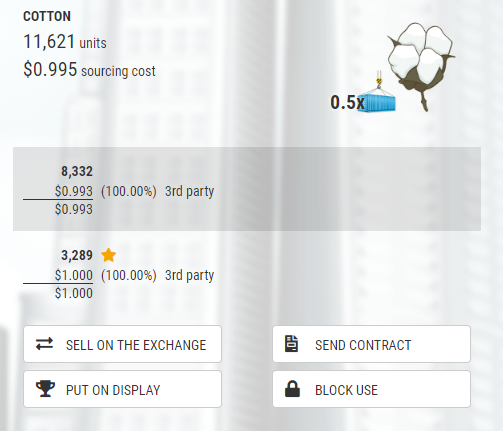
You will pay a market fee when the order is traded. The market fees are paid proportionally for every part of the order filled.
Depending on the resource, you may need to provide Transportation units as well. These can be bought on the exchange.

50x is the transport needed
$3 is the 3% fee (Note: the market fee can vary based on economic changes by the developers)
$0.030 is cost per unit
Note: transport is pulled from your inventory in your warehouse – if you do not have transport you cannot place anything on the exchange.
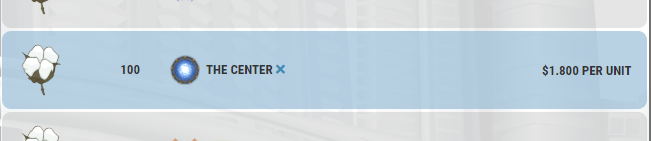
You can cancel your order on the market at any time by clicking/pressing on the blue X next to your name. Or going to your profile and finding the Market Orders box and selecting Cancel.

The transportation units will be returned to you since no product was shipped out of your warehouse.
The market fee that was not paid yet is refunded on cancel, but only after 48 hours from posting. Orders already placed cannot be modified, just cancelled.
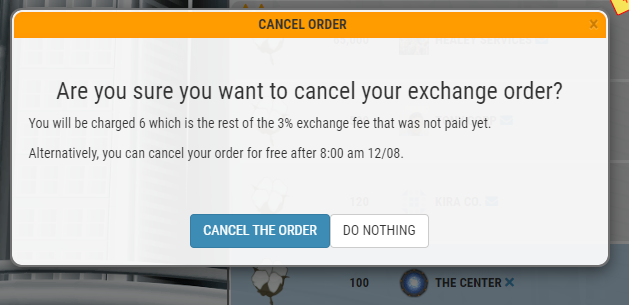
(The example is for 3%; this value can change depending on economic changes by the developers)
For example, you place Crude Oil on the exchange for $28. You will pay a fee of $28 x 3% = $0.84 and use one transport unit, assume that transport costs $0.35. Hence, it will cost you $0.84 + $0.35 = $1.19 to sell the Crude Oil on the market, leaving you with $28 - $1.19 = $26.81. If you sold this Crude Oil using contracts, you pay no market fee and only use half of the transportation units. This would cost $0.35/2 = $0.175, meaning you would be left with $28 - $0.175 = $27.825. Remember to take this into account when deciding to sell on the exchange or to sell via contracts
(Note: the market fee can vary based on economic changes by the developers)
EXCHANGE PRIORITY
When viewing items on the exchange each listing has a priority based on the following:
price / quality / timestamp
Price: lower price has priorityQuality: higher quality has priorityTimestamp: longer time has priority
Timestamp is when it is entered or updated. When updating an order it resets the Timestamp and puts in the back of the line.BUY ORDERSCurrently there is a level 25 requirement. Cost: 1 Sim Boosts per buy order.
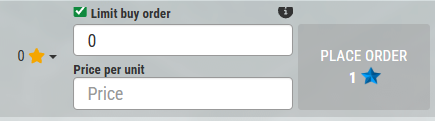
Post a buy orderYou can create a buy order that will stay on the exchange until:
There is a new sell order posted at the same price or lowerThe order is cancelled - cash is refunded in full
Cash needs to be sent to the exchange when an order is posted and counts towards Accounting Overhead (see number 14) the same way as regular cash.Your buy orders be found in Stats tab of your Warehouse.

All buy orders are hidden meaning you cannot see anyone else's buy orders.
9. How do I send contracts?
Need to be level 5+ (Family Business) to send and receive contracts.
Visit your Headquarters (warehouse) and click on the resource, enter quantity and price, and hit SEND CONTRACT. Enter the recipient company's name. The recipient has to accept your contract before the money can be credited to you. Either party can cancel the contract that has not been accepted yet and all resources, including Transportation units will be returned.
25x is the transport needed
There is no fee
Note: transport is pulled from your inventory in your warehouse – if you do not have transport you cannot send a contract.
In comparison to selling on the exchange, by using contracts you will not pay any market fee and need only half as many Transportation units.
10. What do building upgrades do?
All of your buildings can be upgraded to increase production/selling capacity. To upgrade a building you need to visit it and click the UPGRADE BUILDING button. All buildings start at level 1. Upgrading to level 2 doubles the production/selling capacity. A level 3 building will produce/sell 3 times as much as a level 1 building, a level 4 building will produce/sell 4 times as much as a level 1 building and so on.
One level 5 building = Five level 1 buildings (quantity)
11. How is the resource abundance for mines, rigs, and quarries assigned?
The production in the 3 mentioned buildings depends on resource abundance.
The abundance is randomly assigned when buildings is first built and then slowly decreases by 0.032% a day. Each resource produced in the building has its own abundance assigned using Gauss distribution with mean 0.6 (60% abundance) and standard deviation of 0.15. Resulting values over 1 (100%) are truncated to 1 (100%) and values below 0.1 (10%) are truncated to 0.1 (10%).
min(1.0, max(0.1, gauss(mu=0.6, sigma=0.15)))
Helpful information added via the Sim Companies Library:Abundance
12. Can I sell or destroy my buildings?
You cannot sell your buildings but once you reach level 5 you can scrap buildings and recover some of the investment. If a building is level 1 or 2, you will get the full investment back. Any building above level 2 that is scrapped will not receive the full investment back. Destroying a level 5 building will return 5 times the value of a level 1 building.
Case one, construction resources for level 5 farm costs approximately $6,900 + $6,900 + $13,800 + $20,700 + $27,600 = $75,900 to build. If we scrap this level 5 building then we would receive only $6,900 x 5 = $34,500 worth of construction resources back.
Case two, construction resources for level 2 oil rig costs approximately $69,000 + $69,000 = $138,000 to build. If we scrap this level 2 building then we would receive construction resources back worth of $69,000 x 2 = $138,000.
Note: at Company level 20, Building Auctions are unlocked.
13. Why does my administration cost go up?
First of all, congratulations on building a huge company. Otherwise, you would not have this problem! The more employees that you have, the more money you spend on administration overhead. Every time you level up a building you increase the number of workers in your company by 100 as well as adding more administration staff. The more building levels that your company has, the more administration staff are recruited each time you level a building up.
If your administration size grows too much, you want to look at the following options: focus on less labor-intensive products, or invest in buildings that deliver high profit even on low levels. You could also invest in research, this will allow you to get a higher profit for the same resources without expanding your buildings. You may also want to look at hiring a COO, they reduce the administration overhead of your company. See the executives guide for more information.
14. What’s accounting overhead?
Managing all your company funds costs money. Here is how much your company pays in accounting overhead. Executives skilled in accounting can help you lower your accounting base. Buying bonds increases fees. Net Bonds plus Cash minus Executives. See the formula below.
Accounting base = (Bonds Purchased - Bonds Sold) + Cash - Executives' lift
|
|
|
|
|
|
|
|
|
|
|
|
|
|
Example with CFO lift:

$3 million + $4 million = $7 million
Cash and Bonds value over $7 million = $137,918$137,918 x 0.5% = $690 (rounded up)
Accounting fees are deducted automatically every day at the same time. See Time Table for your local time.
Helpful articles from our local newspaper The Sim Companies Times:
Helpful information added via the Sim Companies Forum:
Bank - Need more Executive Lift?
15. What’s research for?
Research allows the production of higher quality products that sell faster allowing you to make more profit. The ability to research unlocks once your company has reached level 10.
You can build laboratories and research centers that produce research points. You can also buy them from other players on the exchange or through contracts. The research points can then be used to get patents, but not every research point result in a patent. So be prepared for losses from researching areas that bring no money.
Enough patents will allow you to produce higher quality products! Patents cannot be sold or transferred to other players.
See the research guide for more information.
16. Where’s the game time table?
The game runs on UTC time, but all times within the game are displayed in the company's local time zone.
See the time table to find out when the daily processes happen.
17. How is Comprehensive Income calculated?
Comprehensive income is an item listed in the Income Statement in your HQ.
It is a result of a two (2) consecutive Balance Sheets compared. Any Company Value (CV) change that is not covered by the items in the Income Statement are called “other comprehensive income.”Items on the Income Statement should cover all company activities that impact the Balance Sheet. Except, for the Volume Weighted Average Price (VWAP) swings of inventory Valuation Allowance (85% of VWAP of the previous day).
Valuation Allowance is an item listed in the Balance Sheet.Definition: Sum of price corrections applied to every single resource to account for resource liquidity. The correction estimates price you would get for each resource if you were to liquidate it on the market using the trading price and volume from the previous day.
Helpful articles from our local newspaper The Sim Companies Times:
18. What are those symbols I see on company pics (avatars)?
There are three (3) symbols that can show up on company avatars:

Certificate Winner – A certificate for gaining a top spots in company rankings and years played.

Trophy Winner – A symbol awarded to those that have won the top spots in contests.

Supporter – A symbol notifying other players they support the game. You too can become a supporter!
All three will show up on the player’s profiles. The certificates can be displayed in the display case.
19. What does Purchases and Returns mean in the warehouse?
Purchases, means product purchased from the Exchange and/or Contracts.
Returns, means product cancelled from the Exchange and/or Contracts; and from Scrapping Buildings.
Purchases and Returns will be removed from that product once it is sold off.
20. I got a message from the Personal Assistant about worker wages increase/decrease and retail changes
The economy goes through phases. This message means the phase just changed. The overall margins on all products stay the same no matter the economy phase. However, the cost to produce products alternate so the retail prices alternate with it.
Checkout the encyclopedia to learn what are the new production costs and retail parameters.
This does not impact you as much if you are dealing with products that have an easy pipeline - or you operate on a just-in-time basis and hence do not store intermediate inventory. If, however, you hold a lot of inventory, the shift in pricing can cause your inventory to be worth more on the economic boom, or less on depression.
There are three phases that the economy can be in. When the economy goes up, retail speeds up, hence goods can be sold faster or can be sold at a higher price. However, the rate of production of these goods falls, therefore, producers will increase their prices to make up for this. When the economy goes down, retail slows down, hence goods sell slower or have to be sold at a lower price. In this case, the rate of production increases and hence producers can sell at a lower price.
21. Can I create more than one account?
This is prohibited. That would create an unfair advantage over other players. See Fair Play Association (FPA).
Note: Realms created two (2) companies under one (1) account. One company in Magnates Realm and one company in Entrepreneurs Realm.
22. Why am I not getting any more Personal Assistant (PA) quests?
Make sure to scroll back to the last PA quest and answer the quest. Once you answer it the notification will go away and you will have access to the rest of the PA quests.
PA quests that are not answered will disappear and come back at a later date.
The newer quests that were added to the game have requirements that need to be met:
Time PlayedHow much cash that your company could potentially lose ($50,000).Executive requirements (level 15)
23. How often are new features added?
Major features are added to the game every month or two.
Small changes are deployed almost every second day, see the change log for the latest updates. There is always something to improve upon and I actively work on the game. If you want to see a few ideas that are under consideration, check out the future development page.
24. Why are incoming contracts different colors? (Red, Green, Black)
Contracts sent by companies will change colors if the price is different than the last accepted contract from that company. The price will change in color.
Red = Higher price than last accepted contract
Green = Lower price than last accepted contract
Black = Same price as last accepted contract
25. How do I reset or delete my account?
In Account Settings.
RESET ACCOUNT:
You will lose:
Company LevelCompany money, warehouse inventory, buildingsAll Sim Boosts unlocksCompany loans, bonds, researchProduction / sales bonus
You will keep:
Supporter statusSim BoostsCertificatesCollectiblesNotes


To Delete your account go to DELETE ACCOUNT.
DELETE ACCOUNT:
Delete this Sim Companies account and all associated companiesPermanently delete all data associated to your account at Sim Companies.
As a safety feature you will have to verify the DELETE ACCOUNT through email.

26. Attitude Control is not spelled wrong?

“Attitude control is the process of controlling the orientation of an aerospace vehicle with respect to an inertial frame of reference.” (wikipedia)
27. Why haven’t I received my Sim Boosts from my purchase?
First of all, thx for for supporting the game!
If you used
Braintree (direct card entry or Paypal) or ALGO, the system checks every hour for payments that did not reflect and auto refund them. The player who is refunded should get a PA message about payment being refunded, this should happen 99% of the time, but it can also happen that the system is not able to find the right player to match it to the refunded payment, in that case it is still refunded, but the PA message doesn't happen. So, please wait an hour, it should be refunded automatically.
If you used
Apple, please try clearing Cache and wait up to 24hrs, sometimes Apple needs some time to confirm the payment. Going back into the Sim Boost checkout and selecting the same Package and pressing "Buy"; may cause apple to process the purchase. If your purchase has still not arrived, please send a screenshot of the purchase confirmation from Apple (Including order ID).
If you used
Google pay (paying from the android app) or armor games: First of all, please clear the game cache on the affected device with this link. You can also try to open the buy screen in game again after about 15 minutes, this could trigger the purchase. Another thing that can help is to close and reopen the game.Unfortunately, sometimes Google even needs up to one day to complete the purchase. If all failed and 24 hours have passed, we still need to issue refunds manually. If this is the case, please tell us your order details (Order ID and E-Mail, order ID starts with "GPA", you have received it from Google).
Concerning these problems, please contact our support.www.simcompanies.com/report
28. Got your own question?
Try asking in the help chatroom, where other players will gladly answer your questions.
Game Guides
Guide for Beginners, Research Guide, Bonds Guide, Executive Guide, Government Orders Guide, Aerospace